AI travel itinerary
builder.
Stop copying ChatGPT paragraphs into Notes. ONVA's AI planner builds day plans from your pins, budget, and location, then saves them as map pins you can actually use.
An AI travel itinerary builder generates trip plans and saves them to your map. ONVA is free on iOS and Android.



Built for couples and nomads who travel together
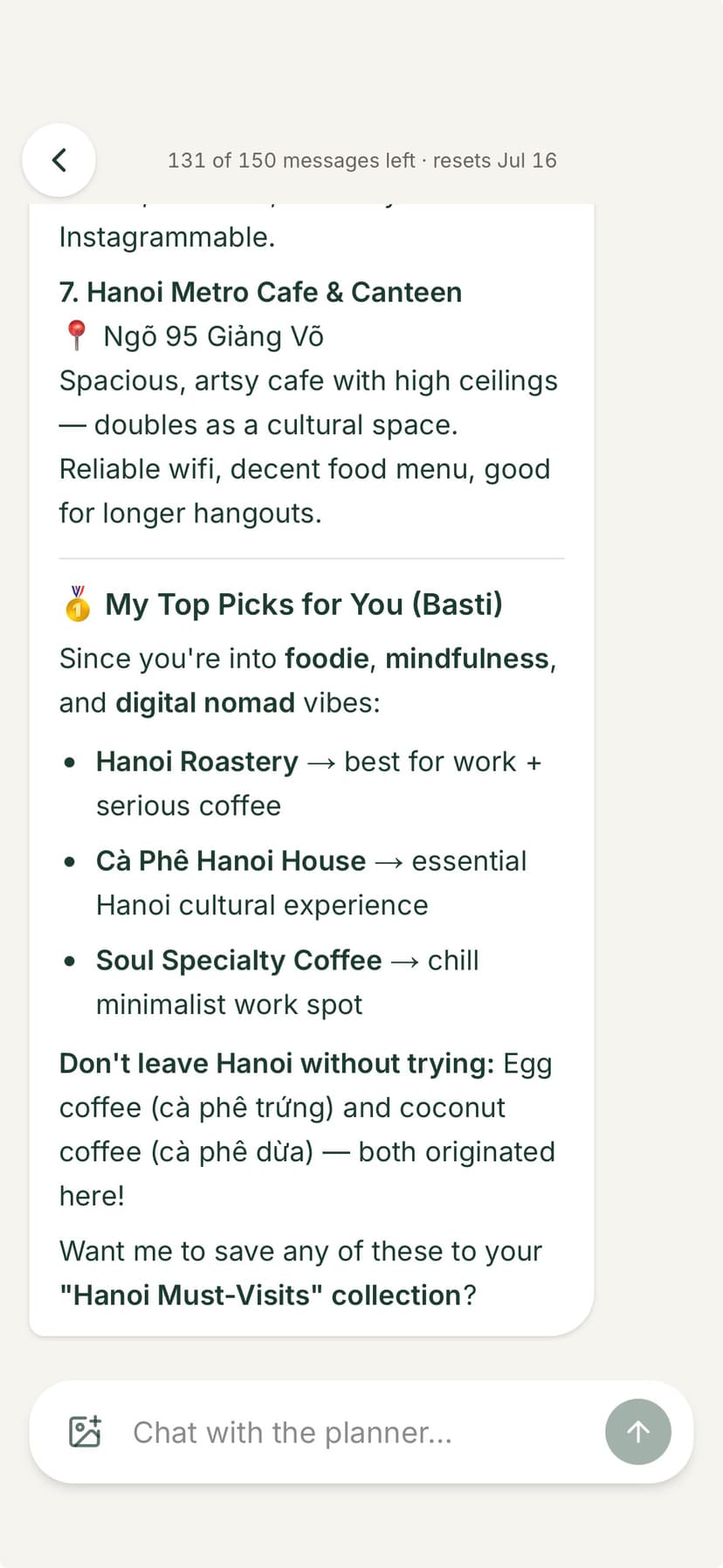
ChatGPT gives text. ONVA gives pins.
Ask ChatGPT for a Lisbon itinerary and you get a wall of text: Day 1 morning at Belém, afternoon at LX Factory, dinner in Alfama. Useful research, but then you manually copy each spot into Google Maps, share links in WhatsApp, and hope both partners saved the same list. The plan lives in a chat window, not on a map.
ONVA's AI travel itinerary builder works differently. It reads your journey context: existing pins, destination, dates, budget, and who is traveling. You describe what you want ('rainy day in Kyoto, under ¥8,000, food-focused') and the planner returns suggestions that save directly as map pins. Both partners see them. Tap for directions. Refine offline.
The output is not a document. It is a navigable, shareable, journey-scoped plan.
The problem
AI plans that die in chat.
Great suggestions. Nowhere to put them.
Text dump fatigue
ChatGPT gives paragraphs. You copy into Notes, then manually pin each spot on Maps.
No map integration
Generic AI does not know your saved pins, budget, or travel partner's preferences.
Partner out of loop
One person runs ChatGPT. The other finds out about the plan at the hotel.
ONVA AI planner vs. ChatGPT
| Feature | ONVA AI planner | ChatGPT |
|---|---|---|
| Uses your existing pins | ||
| Knows journey budget & location | Manual prompts | |
| Saves output as map pins | ||
| Shared with travel partners | Copy-paste | |
| Offline pin access | ||
| Tied to expenses & chat |
Compared for trip planning use case. Verified June 2026.
Input → output walkthrough
How the AI itinerary builder works
From prompt to map pins in under a minute.
01
Input: describe your trip
Destination, dates, budget, interests. '3 days in Porto, €80/day, wine and viewpoints.' The AI also sees pins you already saved.
02
Output: day-by-day suggestions
Morning, afternoon, and evening plans with specific spots. Routes consider your existing pins and realistic travel times.
03
Save to map pins
Accept suggestions and they become pins on your shared journey map. Both partners navigate offline.
AI planner features
Pin-aware planning
Builds around spots you already saved, not generic tourist lists.
Budget-conscious
Set a daily budget. Suggestions match your spending range.
Map pin output
Plans save as navigable pins, not text in a chat window.
Partner-visible
Both travelers see the same AI-generated plan instantly.
Offline access
Pins sync to your device. Follow the plan without signal.
Example: rainy day in a new city
You pinned six restaurants and two museums in ONVA. Weather turns bad. Open the AI planner: 'Rainy Saturday in Kyoto, food-focused, already pinned Nishiki Market.' The planner builds a day around your market pin, adds a covered temple walk and a sake tasting nearby, and skips the outdoor hike you had tentatively planned.
Each suggestion becomes a pin. Your partner sees the updated plan on their map. No forwarding ChatGPT output. No rebuilding a Google Doc. The itinerary lives where you already plan, navigate, and split expenses.
Key takeaways
- →AI itinerary builders should output map pins, not text dumps.
- →ONVA's planner uses your existing pins, budget, and journey context.
- →Input: destination, dates, budget, interests. Output: day plans as pins.
- →Both partners see and navigate AI-generated plans offline.
- →Premium feature included with Trip Pass or Nomad.
Reviews
Travelers who stopped copy-pasting ChatGPT
Real travelers, not marketing filler.
“The AI trip planner actually knew our pinned spots and budget. It suggested a rainy-day museum route that beat anything we found on Google.”
Sarah K.Digital nomad · Bali“I pin every café and viewpoint from client shoots. My boyfriend sees the same map instantly instead of me forwarding Instagram links.”
KathyUGC creator · Koh Phangan“We used to have a shared Notes doc, a Splitwise group, and 200 screenshots. ONVA replaced all three on day one of our Sri Lanka trip.”
Lena & MarcoCouple · 3-week road trip · Sri Lanka
Quick answer
ONVA's AI travel itinerary builder generates day plans from your destination, budget, interests, and existing pins, then saves suggestions as map pins in your shared journey. Unlike ChatGPT text dumps, plans are navigable, partner-visible, and offline-ready.
FAQ
AI travel itinerary builder: questions answered
An AI travel itinerary builder generates day-by-day trip plans from your inputs: destination, dates, budget, interests, and existing pins. ONVA's AI planner saves suggestions directly to your journey map as pins, unlike ChatGPT text dumps you copy into Notes.
ChatGPT gives unstructured text you manually transfer to a map or itinerary. ONVA's AI planner knows your journey's existing pins, location, budget, and travel companions. Output saves as map pins you can navigate to, share with partners, and refine offline.
Tell ONVA your destination, trip length, budget range, and interests (food, museums, hikes, nightlife). The AI uses your existing pins and journey context to suggest a realistic day-by-day plan, not generic tourist lists.
Yes. ONVA's planner reads pins you and your partner already dropped. It builds routes around spots you actually want to visit, then fills gaps with suggestions that match your style and budget.
Yes. Suggestions become map pins in your journey. Both partners see them instantly. Tap a pin for directions. No copy-paste from a chat window.
Yes. Either partner can run the AI planner. Results appear in the shared journey map and chat. Refine together instead of one person pasting ChatGPT output into a Google Doc.
AI trip planning is a premium feature. Core journey features (map, pins, chat, expenses) are free. Trip Pass or Nomad unlocks the AI planner for you and up to three companions.
Generated pins sync to your device and stay available offline. You can navigate and adjust plans without signal.
Build your next itinerary with AI.
Download free. Create a journey, pin your spots, and let AI fill the gaps.
AI planner included with Trip Pass or Nomad.