Shared travel map
app.
Journey-scoped pins both partners see instantly. Offline-ready. Not another Google Maps list only one person maintains.
A shared travel map app syncs pins between everyone on the trip. ONVA is free on iOS and Android.



Built for couples and nomads who travel together
Google Maps lists weren't built for shared trips
Google Maps saved lists work for solo travelers bookmarking spots. For couples and groups, they break down fast. One person creates the list. Sharing requires account linking or sending links. Updates do not always sync in real time. Offline access is inconsistent. And the list has no connection to your expenses, chat, or documents.
The workaround is familiar: screenshot pins, forward Instagram links in WhatsApp, or text addresses nobody saves. By day three, you have spots in three places and neither partner trusts the list.
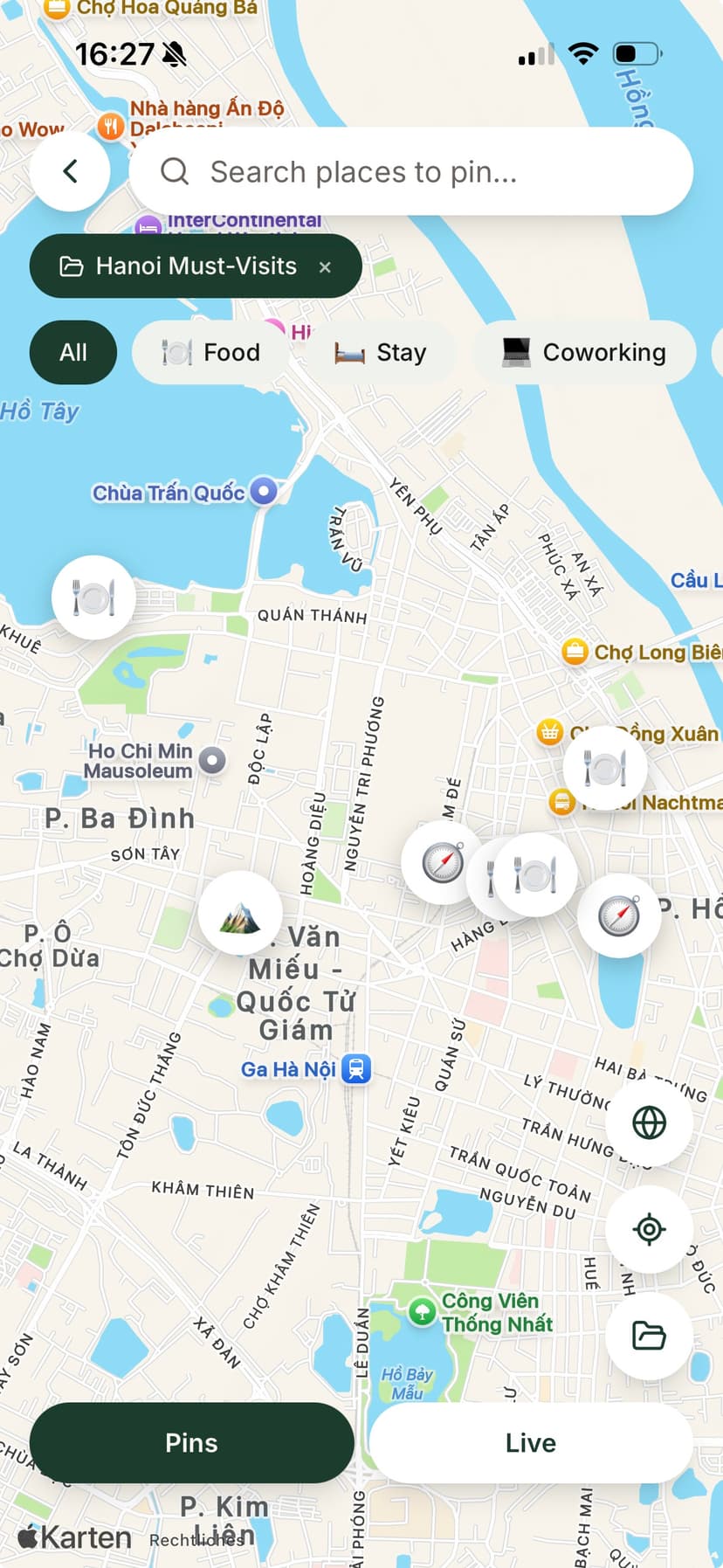
ONVA's shared travel map is journey-scoped. Both partners pin together. Updates appear instantly. Pins work offline. And every spot lives in the same workspace as your expense splits and trip chat.
The problem
One map. One person. Zero sync.
Saved lists don't travel well with a partner.
Pins on one phone
One partner saves spots. The other finds out when they are already in the taxi.
Link forwarding
Instagram reels and blog posts forwarded in chat. Nobody pinned them on a map.
Offline gaps
Saved lists that do not load without signal when you need directions most.
ONVA vs. Google Maps saved lists
| Feature | ONVA | Google Maps lists |
|---|---|---|
| Journey-scoped shared pins | Personal lists | |
| Real-time partner sync | Limited sharing | |
| Offline pin access | Partial | |
| Tied to expenses & chat | ||
| AI plans save as pins | ||
| Both partners pin equally | One person usually owns list |
Compared for couples/group travel use case. Verified June 2026.
Shared map features
Journey-scoped pins
Every spot belongs to this trip. No mixing with your home-city saved places.
Real-time partner sync
One partner pins, both see it. No forwarding links.
Offline maps
Pins and navigation work without signal. Critical abroad.
Connected to expenses
Log dinner at a pinned restaurant. Map and money in one place.
AI pin suggestions
AI planner saves day plans directly as map pins you can navigate to.
How it works
Build your shared map in minutes
Pin together, navigate offline.
01
Create a journey and invite your partner
One shared map workspace for the trip. Both can add pins from day one.
02
Pin spots as you discover them
Restaurants from reels, hikes from blogs, hotels from confirmations. Both see every pin.
03
Navigate offline on the road
Pins sync to both devices. Tap for directions even without cellular signal.
Key takeaways
- →Shared travel maps need journey scope and partner sync, not personal saved lists.
- →ONVA pins update in real time for all journey members.
- →Offline access matters when traveling abroad with spotty signal.
- →Pins connect to expenses, chat, and AI plans in one workspace.
- →Core map features are free on iOS and Android.
Reviews
Travelers who stopped forwarding links
Real travelers, not marketing filler.
“I pin every café and viewpoint from client shoots. My boyfriend sees the same map instantly instead of me forwarding Instagram links.”
KathyUGC creator · Koh Phangan“We used to have a shared Notes doc, a Splitwise group, and 200 screenshots. ONVA replaced all three on day one of our Sri Lanka trip.”
Lena & MarcoCouple · 3-week road trip · Sri Lanka“Receipt scanning and multi-currency splits saved us from the end-of-trip spreadsheet fight. We tapped settle up and went for drinks.”
Tom & AlexFriends · Southeast Asia
Quick answer
ONVA is a shared travel map app with journey-scoped pins that sync between partners in real time and work offline. Unlike Google Maps saved lists, pins connect to expenses, chat, and AI plans in one trip workspace.
FAQ
Shared travel map: questions answered
A shared travel map app lets two or more travelers see the same pins, routes, and saved spots on one map scoped to a specific trip. ONVA's journey map syncs pins between partners, works offline, and ties to expenses and chat, unlike Google Maps saved lists that one person usually maintains alone.
Google Maps saved lists are personal or loosely shared. ONVA's map is journey-scoped: both partners pin together, see updates instantly, access pins offline, and connect spots to expenses and AI plans. No 'can you share your list?' friction.
Yes. When one partner drops a pin, the other sees it immediately in the shared journey map. Pin restaurants from Instagram, hikes from blogs, or hotels from booking confirmations.
Yes. Pins sync to your device and stay available without cellular or Wi‑Fi. Navigate to saved spots in areas with poor signal or on flights.
Add pins manually in ONVA as you discover spots. Many travelers re-pin key locations from their research into the journey map so both partners share one source of truth for the trip.
Yes. Log an expense at a pinned restaurant and it lives in the same journey. See where you spent money relative to where you planned to go.
Core shared map and pins are free on iOS and Android. Premium adds AI planner suggestions that save as pins and live map browsing features.
Yes. Invite multiple members to a journey. Everyone sees the same pins, which helps groups of 3–8 friends coordinate daily plans.
Pin your next trip together.
Download free. Create a journey and start building your shared map.
Free shared map and pins. Offline included.